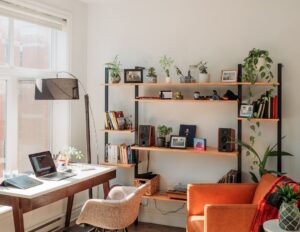
The rise of remote work has transformed the professional landscape, necessitating a re-evaluation of how individuals approach their work environments. For many, the home office has transitioned from a temporary arrangement to a permanent fixture, making the cultivation of a productive space a critical endeavor. This article explores strategies for establishing and maintaining a functional home office, focusing on practical considerations and best practices to optimize workflow and well-being.
A well-designed home office prioritizes the physical well-being of the occupant. Neglecting ergonomic principles can lead to discomfort, strain, and long-term health issues, ultimately impacting productivity.
Chair Selection and Adjustment
The office chair is arguably the most crucial piece of furniture in a home office. Investing in an ergonomic chair is not an extravagance but a necessity for prolonged periods of sitting. Key features to consider include:
- Adjustable Lumbar Support: This feature helps maintain the natural curve of the spine, preventing slouching and reducing lower back pain. Users should be able to adjust both the height and depth of the lumbar support to fit their individual needs.
- Adjustable Armrests: Armrests should allow the user’s elbows to rest comfortably at a 90-degree angle, alleviating strain on the shoulders and neck. The ability to adjust height, width, and pivot is beneficial.
- Seat Depth and Height Adjustment: The seat pan should be deep enough to support the thighs without pressing into the back of the knees. The seat height should permit the feet to rest flat on the floor, or on a footrest if necessary, with the knees bent at approximately a 90-degree angle.
- Tilt Mechanism and Tension Control: A chair that allows for dynamic movement, with a tilt mechanism that can be locked in various positions and tension control, promotes blood circulation and reduces static load on the spine.
Proper adjustment of an ergonomic chair is as important as the selection itself. Users should take the time to customize all available settings to their body type and preferred working posture.
Desk Configuration and Height
The desk serves as the primary workstation, and its configuration significantly influences comfort and efficiency.
- Height-Adjustable Desks: Sit-stand desks, also known as standing desks, offer the flexibility to alternate between sitting and standing throughout the workday. This variation in posture can reduce the risks associated with prolonged sitting, such as poor circulation and musculoskeletal issues. If a height-adjustable desk is not feasible, ensure the fixed desk height allows for arms to be comfortably positioned at a 90-degree angle when typing.
- Workspace Dimensions: The desk surface should be large enough to accommodate essential equipment, such as monitors, keyboard, mouse, and any necessary documents, without feeling cluttered. Adequate depth is crucial to maintain an appropriate viewing distance from monitors.
- Cable Management: Disorganized cables can create a tripping hazard and contribute to visual clutter. Implementing cable management solutions, such as cable ties, sleeves, or trays, can improve safety and aesthetics.
Monitor Placement and Eye Strain
Improper monitor placement is a common cause of eye strain, headaches, and neck pain.
- Eye-Level Alignment: The top of the monitor screen should be at or slightly below eye level. This prevents the user from craning their neck upward or downward unnecessarily.
- Arm’s Length Distance: The monitor should be positioned approximately an arm’s length away from the user’s eyes. This distance can vary based on monitor size and individual vision, but it serves as a good starting point.
- Dual Monitor Setup: For professionals who frequently use multiple applications, a dual monitor setup can significantly enhance productivity. When using two monitors, they should be positioned close together with minimal bezel interruption, and ideally at the same height and distance.
- Anti-Glare Screens: If the home office is susceptible to glare from windows or artificial lighting, an anti-glare screen protector can mitigate reflections and reduce eye fatigue.
Lighting and Ambiance
The quality of lighting in a home office directly impacts concentration, mood, and visual comfort. A well-lit space can enhance productivity, while poor lighting can lead to fatigue and reduced performance.
Natural Light Maximization
Natural light is generally considered superior to artificial lighting for both physiological and psychological reasons.
- Window Placement: Positioning the desk perpendicular to a window is often ideal, as it minimizes glare on the screen while still allowing for ample natural illumination. Directly facing or backing onto a window can lead to uncomfortable screen reflections or backlighting issues.
- Sheer Blinds or Curtains: To manage harsh sunlight or privacy concerns, sheer blinds or curtains can diffuse natural light without completely blocking it, maintaining a bright and airy feel.
- Avoiding Overexposure: While natural light is beneficial, direct, intense sunlight can cause discomfort and overheating. Strategic placement or light filtering solutions are necessary.
Supplemental Artificial Lighting
While natural light is preferred, it often needs augmentation, especially during darker hours or on cloudy days.
- Layered Lighting: A balanced lighting scheme incorporates multiple layers:
- Ambient Lighting: This provides general illumination for the entire room, often through ceiling fixtures.
- Task Lighting: A dedicated desk lamp directs focused light onto the work area, reducing shadows and eye strain for close-up tasks. Adjustable desk lamps allow for precise positioning.
- Accent Lighting: Though less critical for productivity, accent lighting can enhance the overall ambiance and visual interest of the space.
- Color Temperature: The color temperature of artificial light is measured in Kelvin (K).
- Cooler Temperatures (5000K-6500K): Mimic natural daylight and can promote alertness and concentration, suitable for task lighting.
- Warmer Temperatures (2700K-3500K): Create a more relaxed and comfortable atmosphere, suitable for ambient lighting or areas where a softer glow is desired.
- Dimmable Options: Dimmable lights offer flexibility, allowing the user to adjust the light intensity according to the time of day, natural light availability, and specific tasks.
Noise Control and Soundscapes
A quiet environment is conducive to concentration, but complete silence is not always achievable or even desirable for everyone.
- Minimizing External Noise:
- Window Treatments: Heavy curtains or double-paned windows can significantly reduce external noise penetration.
- Door Seals: Ensuring doors have good seals can prevent sound from traveling between rooms.
- Strategic Placement: If possible, situate the home office in a quieter part of the house, away from high-traffic areas or noisy appliances.
- Managing Internal Noise:
- Soft Furnishings: Rugs, upholstered furniture, and wall hangings can absorb sound and reduce reverberation within the room.
- Headphones/Earbuds: Noise-canceling headphones are an effective solution for blocking out distractions, particularly in shared living spaces.
- Utilizing Ambient Sound: Some individuals find certain types of ambient sound beneficial for focus.
- White Noise or Brown Noise Generators: These can mask disruptive background noises and create a consistent auditory environment.
- Instrumental Music: Carefully selected instrumental music, without vocals, can enhance concentration for some. Experimentation is key to determining personal preferences.
Organization and Clutter Management
A disorganized workspace can contribute to mental clutter and hinder efficiency. Implementing effective organizational strategies is fundamental to maintaining a productive home office.
De-cluttering Strategies
Regular de-cluttering is not a one-time event but an ongoing practice.
- The “One In, One Out” Rule: When acquiring a new item, commit to removing an old, similar item. This prevents accumulation.
- Categorization and Grouping: Group similar items together. For instance, all writing instruments in one container, all cables in another.
- Digital De-cluttering: Physical clutter often mirrors digital clutter. Regularly organize digital files, emails, and desktop icons. Delete unnecessary documents and applications.
- Scheduled De-cluttering Sessions: Designate a specific time each week or month for a brief de-cluttering session. Even 15 minutes can make a difference.
Storage Solutions
Effective storage solutions help keep the workspace tidy and functional.
- Filing Systems: For paper documents, a logical filing system (alphabetical, chronological, or by project) is essential. Choose between vertical file holders, file cabinets, or drawer organizers.
- Shelving: Wall-mounted shelves or freestanding bookshelves can store books, binders, and decorative items, keeping the desk surface clear.
- Drawer Dividers and Organizers: These keep small items like pens, paper clips, and sticky notes neatly contained within drawers, preventing them from becoming a chaotic jumble.
- Cord Organizers: As mentioned previously, cable management solutions keep power cords and peripheral cables tidy and out of sight, reducing visual clutter and potential hazards.
- Vertical Storage: Utilizing vertical space with tiered trays or multi-level organizers can maximize storage in a compact footprint.
Digital Organization
In the modern home office, digital organization is often as critical as physical organization.
- Consistent Naming Conventions: Adopt a clear and consistent naming convention for files and folders to facilitate easy retrieval.
- Cloud Storage and Backups: Utilize cloud storage services for important documents, ensuring accessibility from multiple devices and providing an off-site backup. Regularly back up local files to an external drive.
- Email Management: Implement a system for managing emails, such as using folders, labels, or the “inbox zero” approach to quickly process and archive messages.
- Desktop Organization: Minimize icons on the desktop. Create a few main folders for ongoing projects or important documents and store everything else within a structured directory.
Technology Integration
The efficiency of a home office is heavily dependent on reliable and well-integrated technology. Strategic technology choices can streamline workflows and enhance connectivity.
Reliable Internet Connection
A stable and fast internet connection is the backbone of remote work.
- Bandwidth Requirements: Assess the household’s bandwidth needs, considering video conferencing, large file transfers, and other online activities. Upgrading to a higher-speed plan may be necessary.
- Router Placement: Position the Wi-Fi router centrally in the home or as close to the home office as possible to maximize signal strength.
- Ethernet Connection: For critical tasks, a direct Ethernet connection (wired connection) offers superior stability and speed compared to Wi-Fi, minimizing latency and dropped signals.
- Backup Solutions: Consider having a mobile hotspot or a secondary internet provider as a backup in case of primary service disruptions.
Essential Hardware
The right hardware can significantly improve productivity.
- Computer (Laptop/Desktop): Choose a computer with sufficient processing power, RAM, and storage for professional tasks. Desktops generally offer more power and upgradeability, while laptops provide portability.
- Peripherals:
- External Monitor(s): As discussed, external monitors enhance screen real estate and reduce eye strain.
- Ergonomic Keyboard and Mouse: Investing in comfortable, ergonomic peripherals can prevent repetitive strain injuries.
- Webcam and Microphone: For video conferencing, a high-quality external webcam and microphone can significantly improve communication clarity over built-in options.
- Printer/Scanner: A multifunction printer with scanning capabilities may be necessary depending on paper-based workflows.
Software and Applications
Strategic use of software can optimize workflows and improve collaboration.
- Project Management Tools: Tools like Asana, Trello, or Monday.com help organize tasks, track progress, and facilitate team collaboration.
- Communication Platforms: Slack, Microsoft Teams, or Zoom are essential for real-time communication, video conferencing, and file sharing with colleagues.
- Cloud Productivity Suites: Google Workspace or Microsoft 365 provide integrated applications for document creation, spreadsheets, presentations, and cloud storage, promoting seamless work across devices.
- Password Managers: Securely manage multiple professional logins with a password manager, enhancing security and reducing login friction.
- Time Management and Focus Apps: Applications like Pomodoro timers, focus music apps, or website blockers can assist in maintaining concentration and managing work intervals.
Personalization and Well-being
| Metrics | Data |
|---|---|
| Number of Remote Workers | 50 million |
| Productivity Increase | 47% |
| Employee Satisfaction | 82% |
| Flexible Work Hours | 67% |
While productivity is paramount, a home office should also be a space that supports the individual’s well-being. Personalization can foster a sense of ownership and comfort, encouraging sustained focus.
Incorporating Greenery
Plants can have a positive impact on the office environment.
- Air Quality Improvement: Certain plants act as natural air purifiers, removing toxins and increasing oxygen levels. Examples include snake plants, peace lilies, and spider plants.
- Stress Reduction: Studies suggest that exposure to nature, even in the form of indoor plants, can reduce stress, improve mood, and enhance cognitive function.
- Aesthetic Enhancement: Plants add a touch of natural beauty and vibrancy to the workspace, making it more inviting and visually appealing.
- Low-Maintenance Options: Choose low-maintenance plants suitable for indoor conditions if gardening is not a primary interest.
Personal Touches and Inspiration
A home office should reflect the personality of its occupant.
- Motivational Decor: Displaying framed artwork, photographs, or quotes that resonate personally can provide inspiration and a sense of calm.
- Comfort Items: A cozy blanket, a comfortable cushion, or a personalized mug can add a layer of comfort without compromising professionalism.
- Color Psychology: Consider the impact of color on mood and energy.
- Blues and Greens: Often associated with calmness and concentration.
- Yellows and Oranges: Can stimulate creativity and energy.
- Neutrals: Provide a balanced and uncluttered backdrop.
- Avoid Over-Personalization: While personal touches are beneficial, avoid excessive clutter or distractions that could detract from the work environment. The office should still feel like a place of purposeful activity.
Establishing Boundaries
Maintaining a healthy work-life balance is crucial when the office is in the home.
- Designated Workspace: Clearly defining the home office as a dedicated work zone, even if it’s a corner of a room, helps mentally separate work from personal life.
- Consistent Work Schedule: Adhere to a regular work schedule, including start and end times, breaks, and lunch. This routine helps regulate the workday and prevent burnout.
- “Communal” Rituals: Create rituals to signal the start and end of the workday, such as changing into work clothes, taking a short walk before starting, or closing the office door at the end of the day.
- Communication with Household Members: Establish clear expectations with family or housemates regarding work hours, meeting times, and the need for uninterrupted focus.
- Disconnecting: Actively disconnect from work after hours. Avoid checking emails or engaging in work-related tasks outside of designated work times to ensure adequate rest and personal time.
Creating a productive home office space requires a holistic approach, considering not only equipment and technology but also physical comfort, mental well-being, and effective organizational practices. By systematically addressing these elements, individuals can cultivate an environment conducive to sustained focus, efficiency, and overall job satisfaction in the evolving landscape of remote work.
FAQs
What is the importance of designing a home office space that boosts productivity?
Designing a home office space that boosts productivity is important because it can help create a conducive environment for focused work, reduce distractions, and improve overall work efficiency.
What are some key elements to consider when designing a home office space for productivity?
Key elements to consider when designing a home office space for productivity include ergonomic furniture, adequate lighting, organization and storage solutions, and incorporating personal touches to create a comfortable and inspiring work environment.
How can the layout and organization of a home office space impact productivity?
The layout and organization of a home office space can impact productivity by influencing workflow, reducing clutter and distractions, and promoting a sense of order and efficiency in the work environment.
What role does technology play in designing a productive home office space?
Technology plays a crucial role in designing a productive home office space by providing tools for communication, collaboration, and task management, as well as enabling seamless integration of digital devices and equipment for efficient work processes.
What are some tips for creating a productive home office space on a budget?
Some tips for creating a productive home office space on a budget include repurposing existing furniture and accessories, utilizing cost-effective organization solutions, shopping for second-hand or discounted office equipment, and prioritizing essential items that directly contribute to productivity.